WayForPay Acquiring in CRM
WIKI: INTEGRATION
The most comprehensive list of integration functionality and the operating principles of the widget.
Widget Integration Functionality for Wayforpay Online Payments in CRM
- Merchants: Unlimited quantity
- Payment Methods: Google Pay, Apple Pay, VISA, MasterCard, and 18 other payment types.
- Acceptance of Card Payments: VISA, MasterCard from any country worldwide.
- Currencies: Support for 17 currencies, including UAH, USD, EUR, GBP, PLN.
- Invoice, Payment Page, Payment Widget Language: ENG, UA, RU.
Invoices:
- Creation of invoices directly from Lead Cards, including invoice updates after data changes.
- Generation of payment links and QR codes for use in messengers.
- Discount and advance payment tracking.
Automation:
- Tracking payment status.
- Modifying Lead stages.
Didn’t find a specific function? Need clarification?
Ask support how to implement your task using widget functionality, including Salesbot and DigitalPipeline.
How often is the widget updated?
Find out from support after installing the widget to learn about features we’ll add in the next integration version.
Monthly plan
- Flexible pricing.
- Special program for partners.
- Rewards for referrals and feedback.
Trial Period: 30 days
Trial period for using the integration.
Widget Operation Principle
How to Use the Integration
After installing the widget into your CRM account, a WayForPay tab appears in the Lead Card, where parameters for the future invoice are entered. It is assumed that CRM users work in this tab.
In the tab, you can modify parameters set by default in the widget settings: merchant, invoice language, and currency. Additionally, you can specify the «invoice lifespan» in hours—this is the duration of the payment link. Below, the total invoice amount is displayed, considering the advance payment, discount, and the invoice recipient.
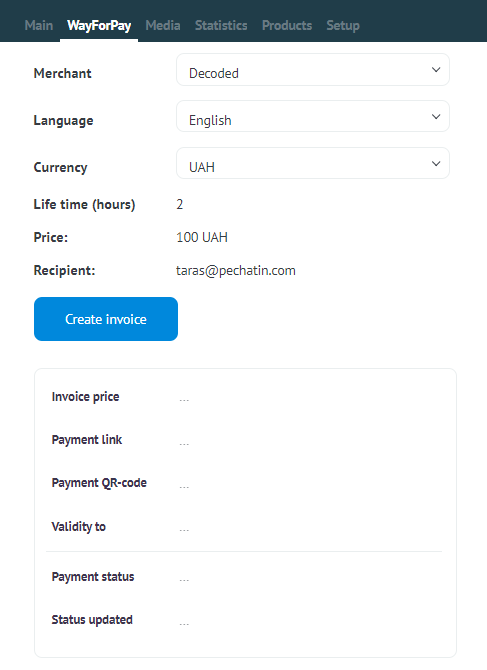
Upon pressing the «Create Invoice» button, an invoice is generated based on the data from the Lead Card. After the invoice creation process is complete, fields below the invoice creation button are automatically filled and are not editable. The payment status is updated automatically. The precise date and time of the status update are indicated in the field below «Status Updated.»
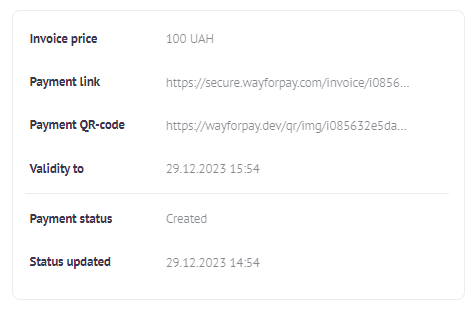
Data from the fields can be copied for use in communication with the client and can also be utilized in business process automation tools.